case study

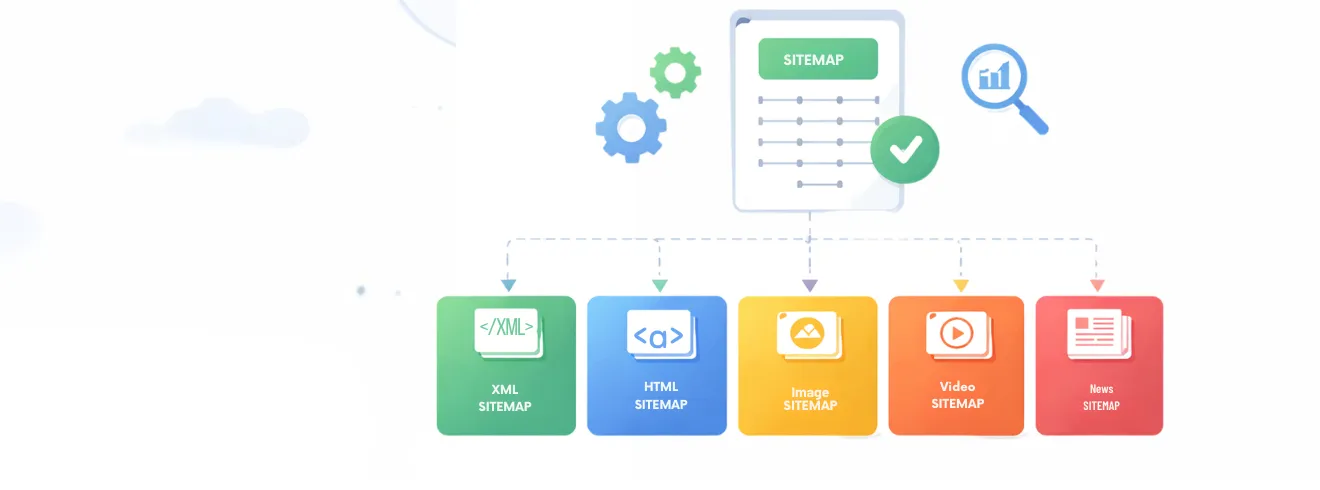
Sitemaps help search engines discover the important URLs on your website, but they do not guarantee indexing or higher rankings. The main types include XML, HTML, image, video, and news sitemaps. Learn which sitemap your website needs, what URLs to include, how to create and submit a sitemap, and how to avoid common sitemap errors.
A sitemap is a file that lists the important URLs on a website and helps search engines discover and crawl them more efficiently. It provides search engines with information about pages, posts, images, videos, and other content that you want them to find. The most common type is an XML sitemap, which is primarily created for search engines, while HTML, image, video, and news sitemaps serve different purposes.
A sitemap is particularly useful for large websites, newly launched websites, websites with many pages, or sites where some pages may be difficult to discover through internal links. However, submitting a sitemap does not guarantee that every URL will be crawled, indexed, or ranked. Search engines still evaluate factors such as content quality, internal linking, technical SEO, page accessibility, and overall website authority before deciding whether to index a URL.
A sitemap acts like a roadmap of your website, providing search engines with a structured list of URLs that are available for crawling. It helps search engine crawlers understand the structure and content of a website, especially when pages are new, deeply nested, or not easily discovered through internal links.
Sitemaps can include additional information about URLs, such as when a page was last updated and whether it contains images, videos, or news content. Depending on the website’s needs, different sitemap formats can be used to help search engines discover specific types of content.
Simply put, a sitemap helps search engines find and understand the pages you want them to discover, but it does not guarantee that those pages will be indexed or ranked.
A sitemap helps search engines discover important URLs on your website. After discovering these URLs, search engines can crawl and evaluate the pages before deciding whether to include them in their index.
There are different types of sitemaps in SEO, and each one is meant to help search engines crawl and index certain types of content more quickly. Your website will achieve better SEO results when you understand SEO sitemap types and their appropriate usage:
| Sitemap Type | Purpose | Best For |
|---|---|---|
| XML Sitemap | Helps search engines discover important URLs | Most websites |
| HTML Sitemap | Improves website navigation for users | Small and medium websites |
| Image Sitemap | Helps search engines discover image content | E-commerce and portfolio websites |
| Video Sitemap | Provides information about video content | Video-focused websites |
| News Sitemap | Helps search engines discover recent news content | News and publishing websites |
An XML sitemap is the most common and widely used type of sitemap. The XML sitemap serves as a complete inventory of your website pages, which enables search engines to index your content faster.
lastmod).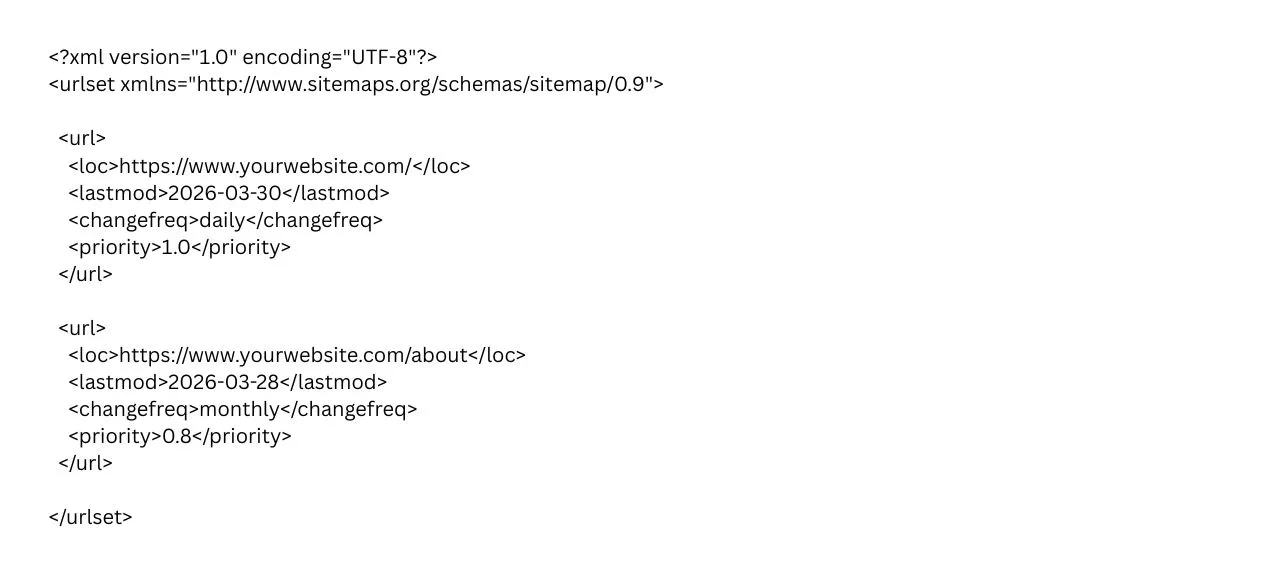
An HTML sitemap is basically designed for human visitors rather than search engines. It makes it easier for people to find their way around a website by giving them a simple, organised list of pages.
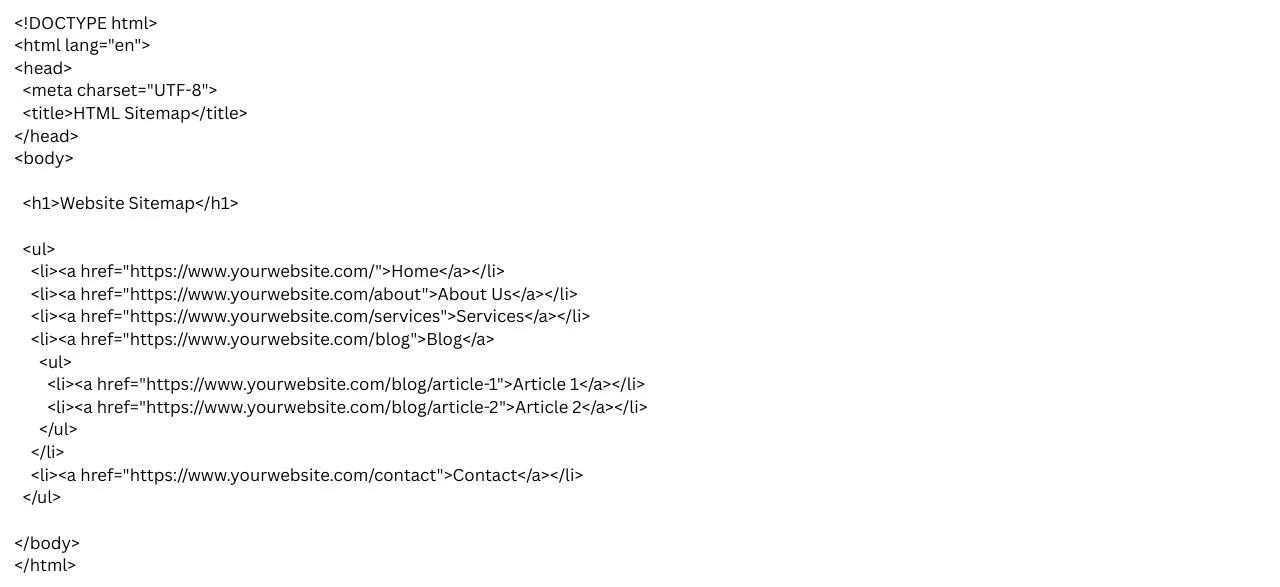
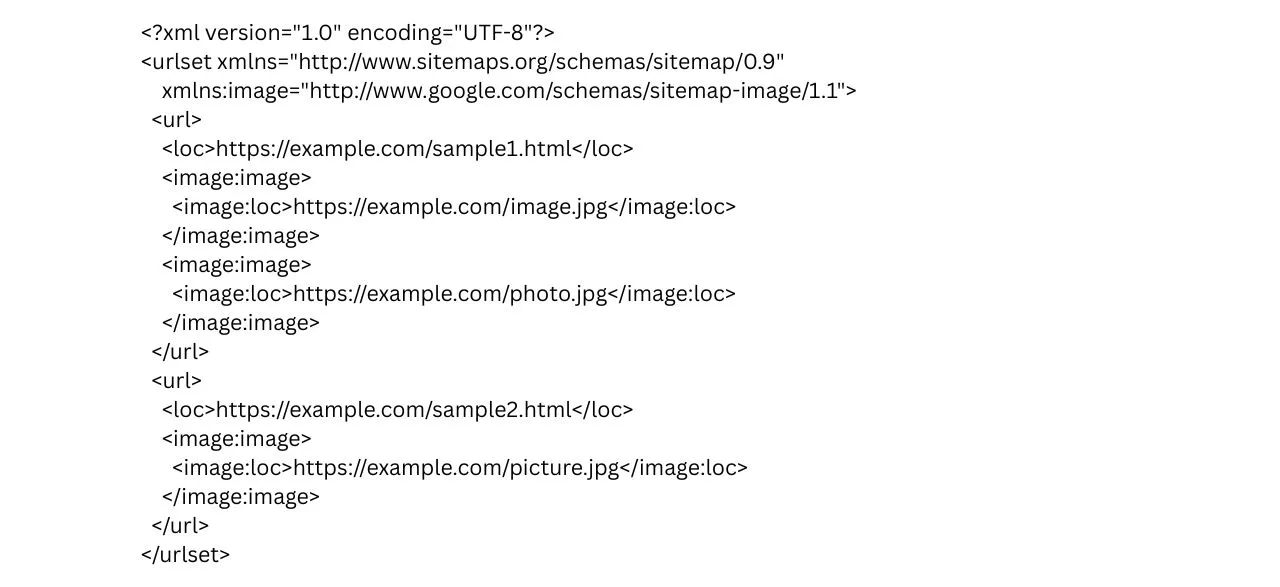
If your website is more visually inclined and contains a lot of images, an image sitemap makes sure that search engines index the images correctly and understand their context.
A video sitemap is designed to help search engines understand the content of videos on your website. This ensures that search engines will correctly index your video content.
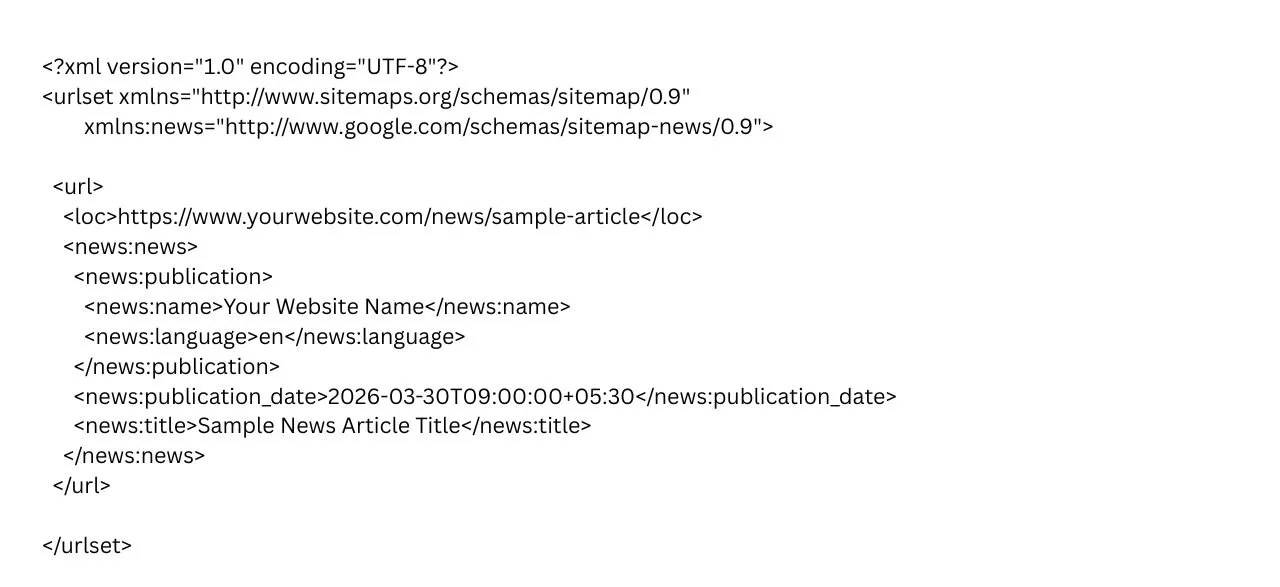
A news sitemap helps search engines index news articles quickly. This is crucial to get your content featured in Google News.
Creating a sitemap is simple with the right tools and methods. Here are a few ways you can generate one for your website:
Why take the burden when Blacklisted is around? As an SEO agency, our professional SEO services include sitemap creation and optimisation as part of a comprehensive SEO strategy, ensuring your website is ready for search engine crawling and indexing with ease.
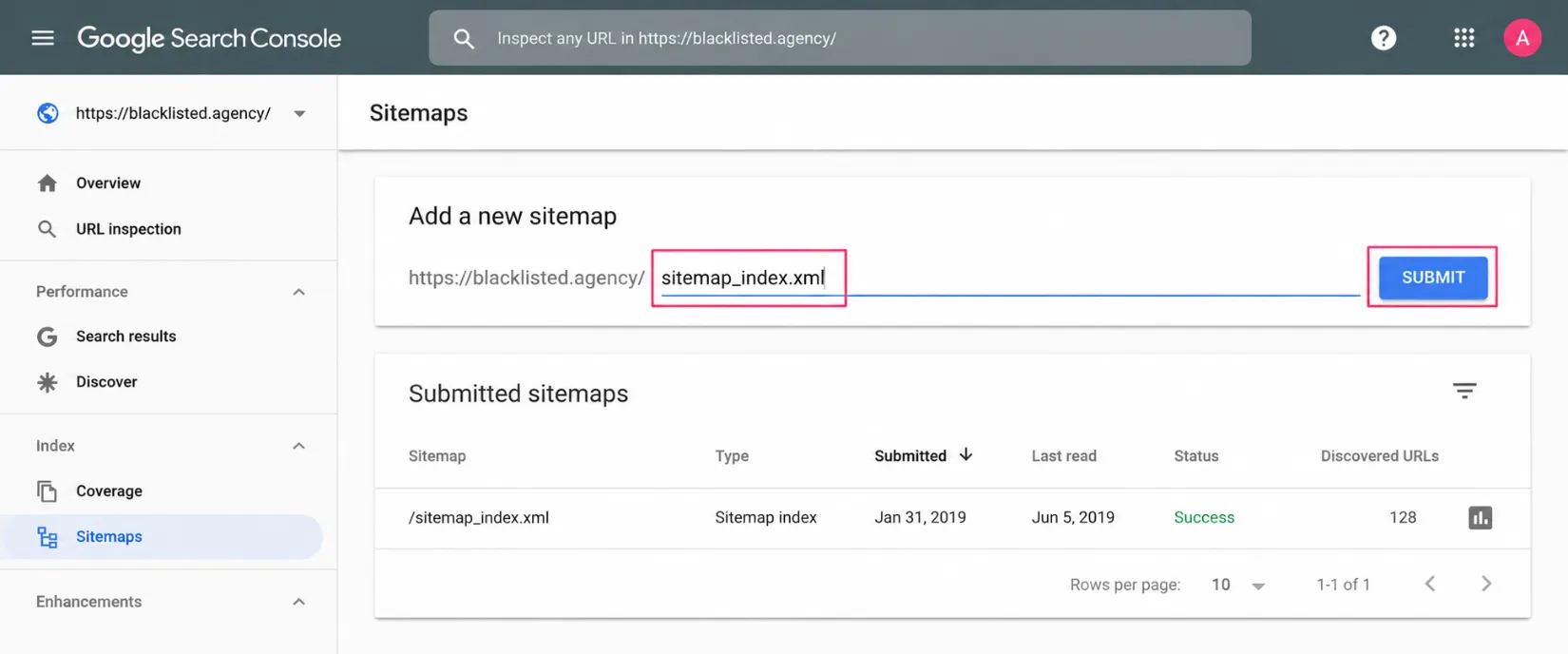
Submitting your sitemap to Google Search Console helps Google discover the URLs you want it to crawl. Follow these simple steps to submit your sitemap and check whether Google can process it successfully.
| Step | What to Do | Details |
|---|---|---|
| 1 | Find Your Sitemap | Locate your XML sitemap, commonly found at sitemap.xml or sitemap_index.xml. |
| 2 | Open Google Search Console | Sign in to Google Search Console and select the verified website property you want to manage. |
| 3 | Go to Sitemaps | From the left-hand menu, select Indexing → Sitemaps. |
| 4 | Enter Your Sitemap URL | Enter the sitemap path in the Add a new sitemap field, such as sitemap_index.xml. |
| 5 | Click Submit | Click Submit to send your sitemap to Google for processing. |
| 6 | Check the Status | Check the Sitemaps report to see whether Google successfully processed your sitemap or detected an error. |
| 7 | Fix Sitemap Errors | Resolve issues such as inaccessible files, invalid URLs, blocked pages, or incorrect sitemap formatting. |
| 8 | Monitor Your Sitemap | Regularly review the Sitemaps report to ensure Google can process your sitemap and discover your important URLs. |
Following best practices for your sitemaps will help you get the most out of them and make your website’s SEO better. This will make them more useful and easier for search engines to crawl. Here are some important tips:
Your sitemap should always reflect the current structure of your site. If you add new pages or update existing ones, make sure your sitemap is updated as well.
Tip: Tools like Google Search Console and SEO plugins for CMSs (e.g., Yoast SEO) help automate this process.
Your sitemap should contain canonical, indexable URLs that return a 200 status code. Avoid adding redirected, duplicate, noindex, or broken URLs, as these can make your sitemap less useful for search engines.
If your website is big, break up your sitemap into smaller files to make it easier to work with. There can be up to 50,000 URLs in each sitemap, and the total size should not be more than 50MB.
Tip: To keep track of more than one sitemap, make a sitemap index file. This makes it easier for search engines to crawl bigger websites.
Ensure your sitemap includes all types of content on your website, such as pages, images, videos, and news articles.
Tip: If your site contains rich media like videos or images, use video sitemaps or image sitemaps to help search engines index this content properly.
You must create your sitemap in an XML format which search engines can process. The official XML Sitemap Protocol provides a reliable method that should be followed to prevent potential errors.
Tip: Regularly validate your sitemap by using tools like XML Sitemap Validator to conduct regular sitemap validation tests, which will help identify issues that need fixing before submission.
Once your sitemap is ready, submit it to Google Search Console and Bing Webmaster Tools to help search engines crawl and index your site more effectively.
Tip: Submitting a sitemap directly to search engines helps them discover new content faster, even if there are no external links pointing to it.
Be careful not to include duplicate URLs or non-canonical pages in your sitemap, as this can lead to indexing issues and hurt your SEO.
Tip: Use canonical tags on duplicate content to indicate the preferred version of a page.
Once you submit your sitemap, monitor its performance through Google Search Console. Look for crawling errors, warnings, and whether all your pages are indexed. Fix any issues promptly to ensure search engines can properly discover and crawl your important URLs.
If you notice recurring crawling, indexing, or technical problems, review these technical SEO issues and their fixes to identify and resolve common problems that may affect your website’s search performance.
We are a professional SEO agency in India with expertise in delivering result-driven digital marketing solutions. We ensure your website is fully optimised for SEO, including effective sitemap creation and optimisation to support better crawling, indexing, and search visibility. Our team creates tailored sitemaps that prioritise important pages and organise content for efficient crawling.
We regularly update and monitor sitemaps to keep them aligned with SEO best practices. With our professional SEO services, we help ensure your website is technically sound and positioned for stronger organic search performance.

Choosing the right sitemap is an important part of making your website easier for search engines to find and making it more visible online. A well-organised sitemap helps search engines find your website’s content, points them to your main web pages, and makes sure that all parts of your site are fully crawled and indexed. Your website will miss valuable ranking opportunities, which would lead to higher search results positions without them.
A sitemap is only one part of a broader SEO strategy, which should work alongside content, technical optimisation, internal linking, and other search marketing activities. You can also explore how SEO vs PPC can support different business growth goals.
Understanding the types of sitemaps in SEO is essential for helping search engines discover your website’s most important content efficiently. XML sitemaps are the primary choice for most websites, while HTML, image, video, and news sitemaps can support specific content and visibility needs. However, a sitemap alone does not guarantee crawling, indexing, or higher rankings.
For stronger SEO performance, keep your sitemap updated, include only relevant and indexable URLs, remove errors and duplicates, and regularly monitor it through Google Search Console. If you want to build a technically sound SEO foundation, Blacklisted can help create, optimise, and manage your sitemap as part of a broader SEO strategy focused on sustainable organic growth and better search visibility.

We are your go-to source for everything digital. We cover marketing tips, design trends, new tech, and how to build your brand. Every post has useful information to keep you updated and ready to tackle the digital world. It’s not just articles; it’s a way to learn, grow, and connect with others navigating the same digital journey.